Tracking an eSignature is more convenient in PBS. Now, quotes with an eSignature will display a status showing whether the signature process is underway, complete, or declined. The update is automatic and available to all users, so no setup or action is required to begin using it.
See When the E-Sign Process Has Started
Quotes will display as one of three statuses:
- Pending: The agent has signed, but the policyholder has not yet signed.
- Complete: Both the agent and policyholder have signed.
- Declined: The policyholder declined the quote.

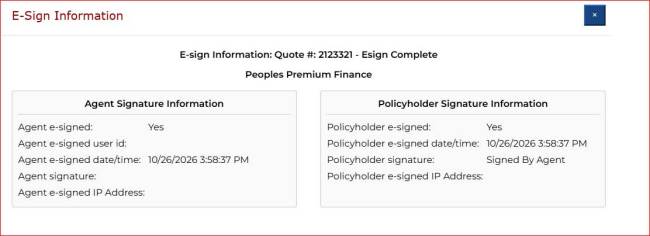
If you need more information, select the status icon on the quote to open the e-sign information window. The window provides signature details for both the agent and the policyholder, including whether each person has signed and when the signature was completed.
Have questions or want to reach out to the Peoples Premium Finance team? Contact us at peoplespf@pebo.com or call 844.292.9090.